Selected

Later Ctrl + ↑

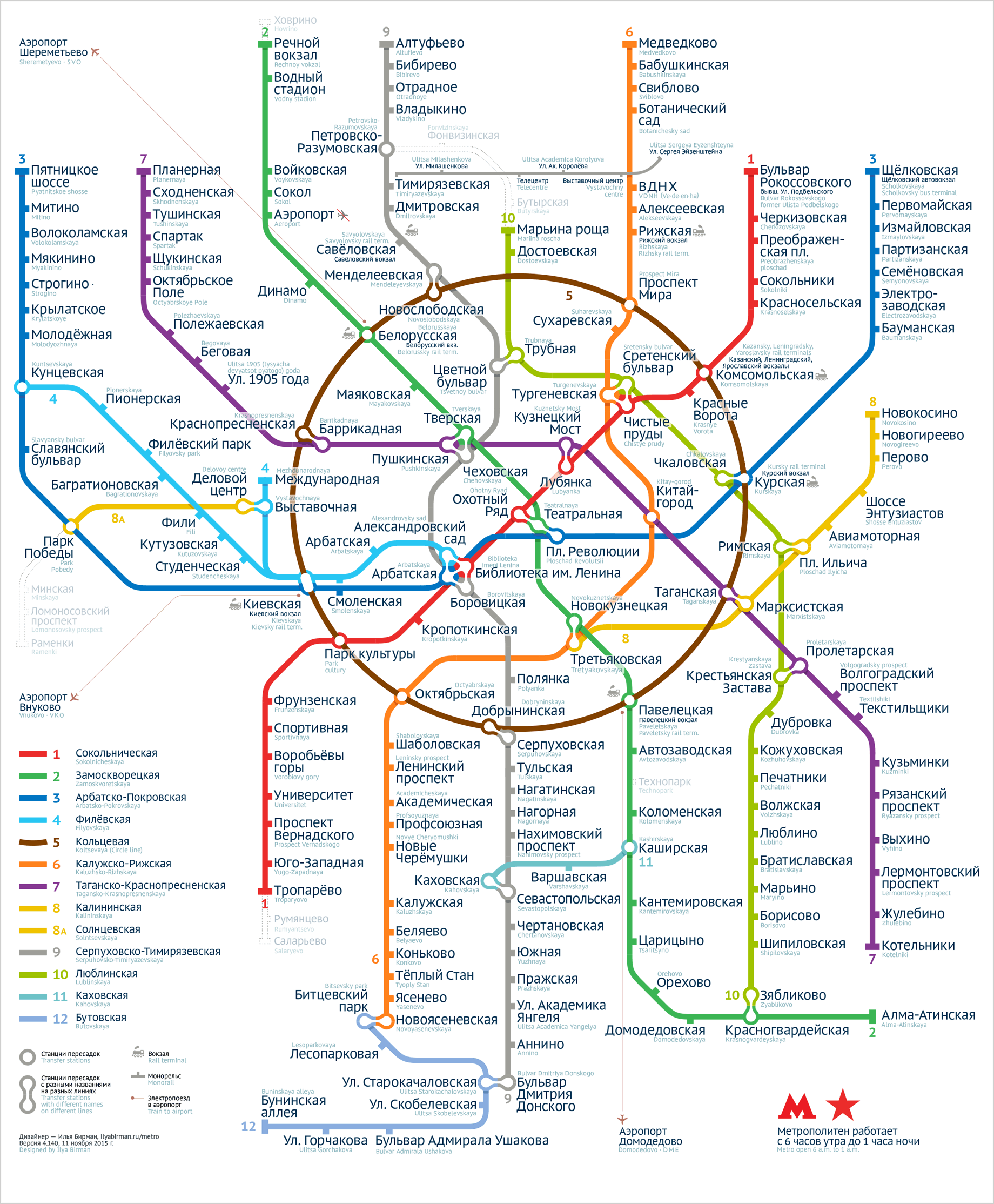
The fourth version of Moscow metro map

I made my first Moscow metro map in 2007. The official map was disgusting then, but nobody cared. My work inspired many designers to try to design their own map. I know several designers who gave up after they’ve appreciated how hard the task actually was. I had two major revisions of my map including the one for the official 2013 competition for the new map to be used on the system. In that version I’ve solved the problem of the Biblioteka imeni Lenina junction and invented the Compass (more on that on the 2013 map’s page in my portfolio). I took the second place.

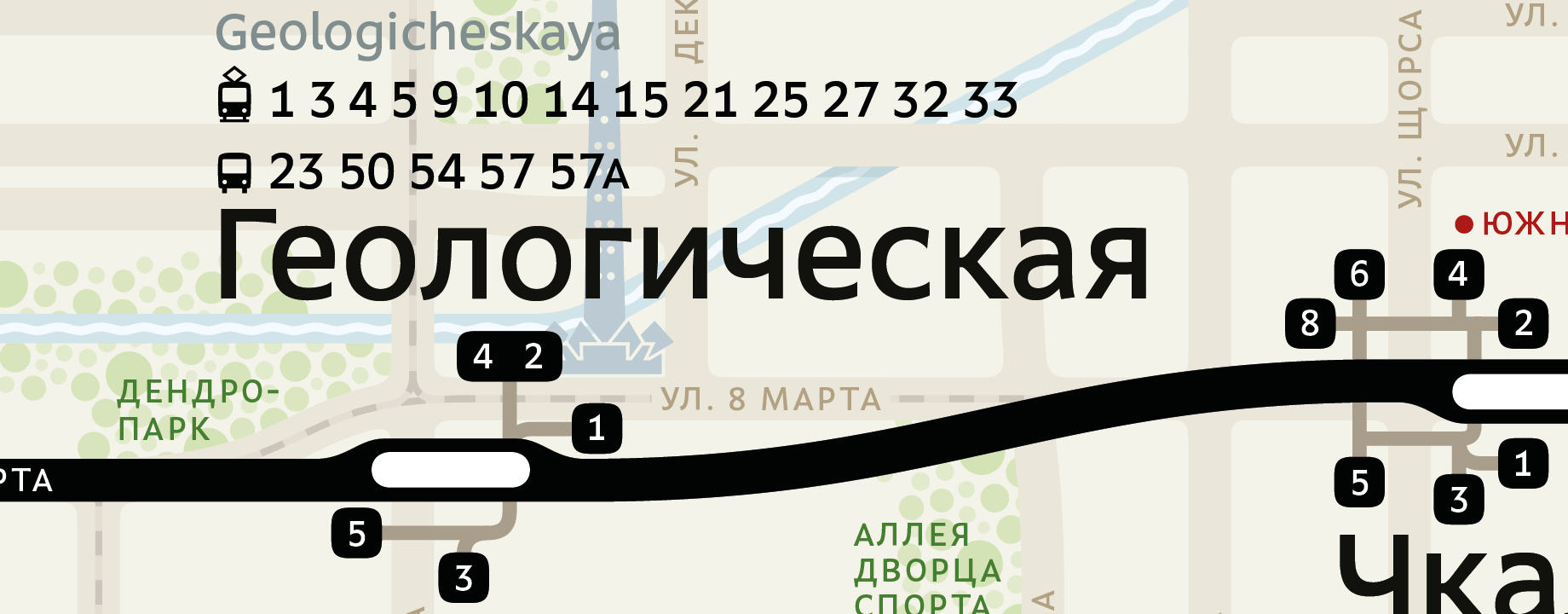
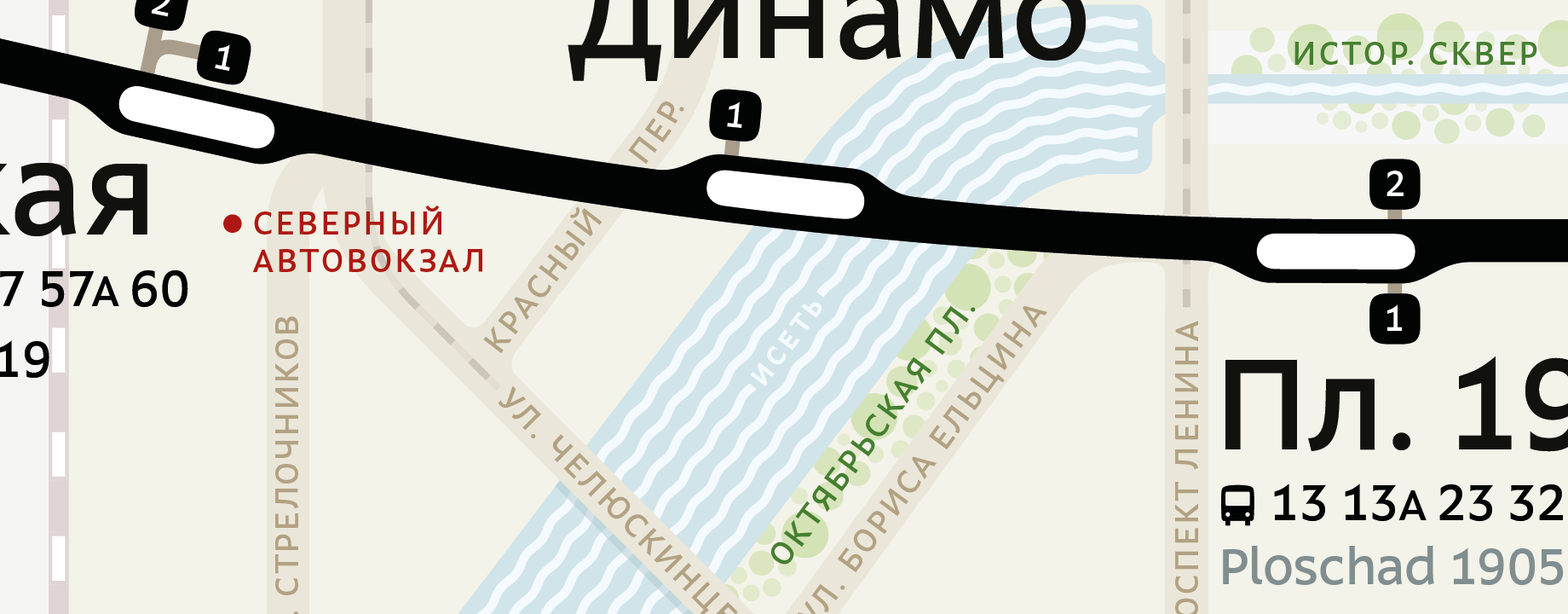
In the beginning of 2015 I saw many ways to make my map better. I wanted to use the space more efficiently and to improve the graphical design: remove the dirty gradients and pseudo-realistic shadows, use beautiful peanut-like transfers that I imagined. It took most of the 2015 to design the new map.

Here it is:

I like it on every level, it’s beautiful. I’ve spent much time to perfect the overall shape, the graphical rhythm, the relationships between the widths of the lines, ticks and circles. Inside the Circle line, I’ve found the most even distribution of captions and white space. This not only looks calm and unforced, but also makes possible a significant font size increase as the space is never lost.

I also had to engineer a special version of the PT Sans font for the map. I used PT Sans in the previous version and I like it. But it has a problem: the capital letters are too high. When you have a multi-line caption, you have to make its line height quite large, which is hindrance when you strive for density. So I had to create a version of PT Sans with lower capitals and slightly less prominent accents specially for the map. Thanks to Anna Danilova for help with this.

Go see the new map’s page in my portfolio. There you can also download a PDF to see the map in detail. Don’t forget to share.

Jouele 2.0

Jouele 2.0

Three years ago I made Jouele, a good audio player for the web.

Eugene Lazarev has made version 2.0. The player has dropped the skeuomorphic look and got even nicer. It is now easier to customize the colours. The new version has dynamic initialisation, and is a jQuery plugin with an API (these are presumably good things). I have installed it on my website.

Related:

How accidental promises hurt reputation

With Alex Babaev we have a policy of no comments about the future of Ångström. We want the freedom of being able to change our minds any time. And we don’t want to look like jerks who don’t keep promises. So whenever somebody asks about our plans or requests a feature, we just thank them and explain that we do not pre-announce things.

About a year ago I got this email message from a user:

Best converter ever, I immediately deleted all the others, yours has the best UI. Really nice would be a German translation. Can I help you with that? Should be pretty easy, just give me a list with variables.

We had Ångström 1.1 in the App Store and were waiting for 1.2 to get approved. We also had the German translation done by that moment and we were planning to ship it in version 1.3. So something broke in my head that day and I responded:

We’ve started the work on German translation recently. We cannot promise anything so far, but it is likely to be added in an update (not in 1.2 though). Thank you for being ready to help, we will drop you a line if we have questions.

And thank you for the kind words!

I didn’t say it had been done, I said we’d started the work on it. I even said “We cannot promise anything”! But that’s not how things work. As I learned later, I promised to ship German translation in 1.3 in that email. In March, I got another message from that same person:

I was a little sad, there was no German translation in the 1.3 update.

I, too, was sad. Why didn’t we ship German in 1.3? While it was ready for version 1.2, the translation became a little bit obsolete when we finished work on 1.3. We added many new features which were not covered by the translation we had. We could delay the release of 1.3 to update the translation, but we decided that it was more important to ship the actual features. And so we did.

In versions 1.4 and 1.5 Ångström and our German translation further diverged. We just couldn’t find time to update it, because other features felt more important. In August, I got another message from the person:

A year ago I asked about German translation. I even offered my help. You stated, your team already started working on it, so I bought the damn thing. A year later… nothing happened. Thanks for lying to me.

This was not a message I enjoyed reading. I almost started a reply saying that actually I had not promised anything. So technically I did not lie! But we are not in court, and what matters is not what I wrote in that first message, but what my words felt like. And they really felt like we were going to add the German translation in 1.3.

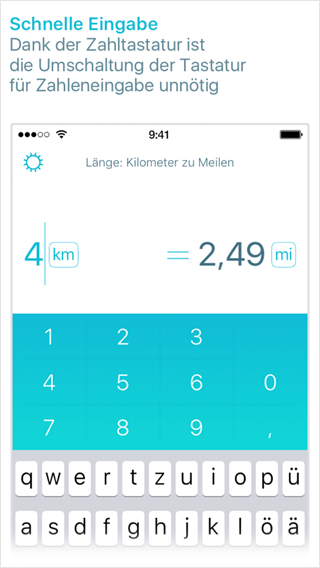
Ångström in German

We finally shipped German with version 1.6 a week ago, more than a year after that letter where I promised in it 1.3. I am sorry about that.

Don’t repeat my mistake. Don’t say anything about the future of your product except that you don’t want to say anything about it.

Ångström: onboarding and light redesign

We’ve updated Ångström to version 1.6.

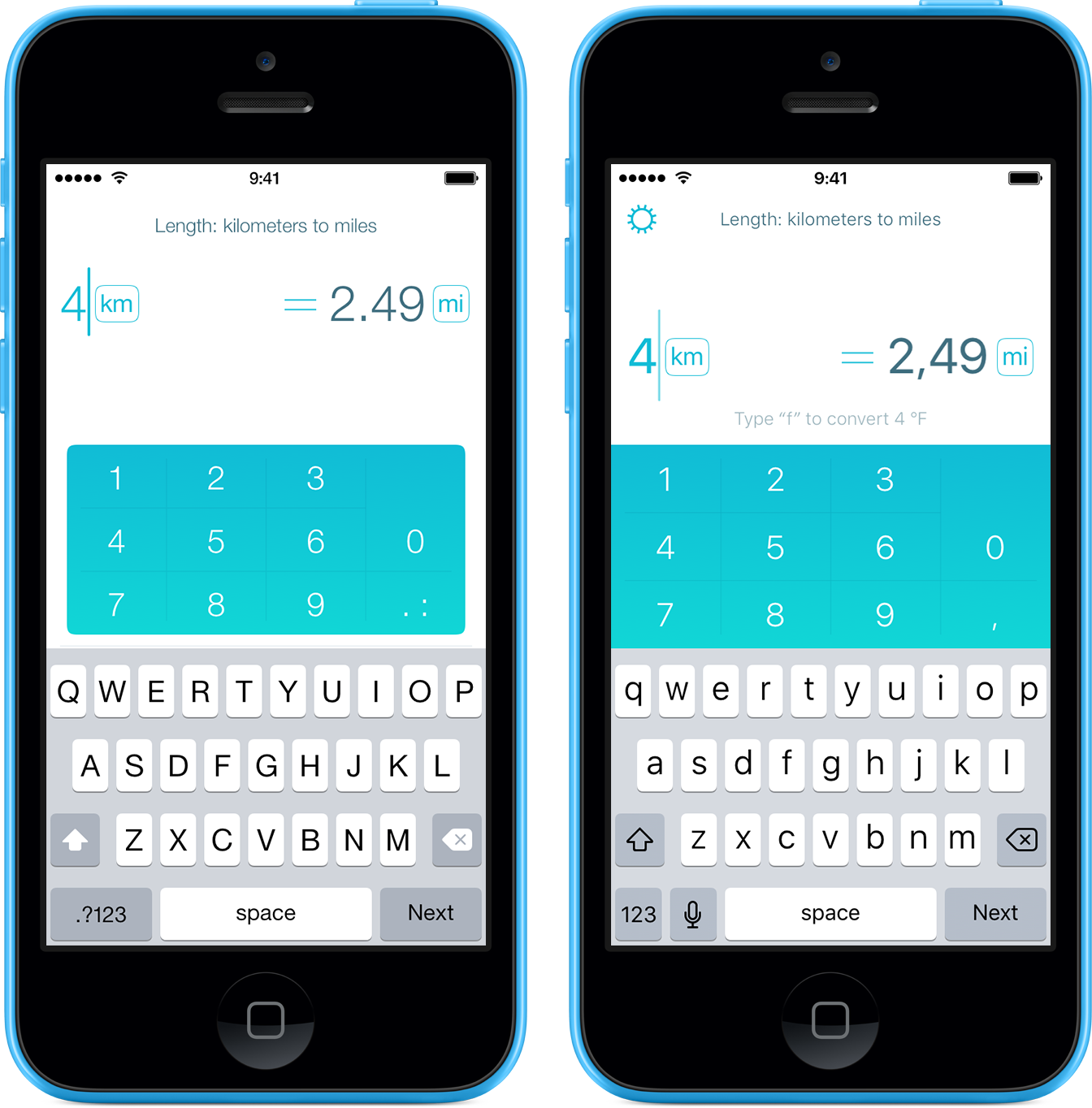
First, we’ve lightly redesigned the app. The numeric keyboard got full width and there’s now a gear icon to go to the About screen (few people could find it before). Everything looks twice as cool now, especially if you have iOS 9 with the San Francisco font. Before and now:

Ångström 1.6

Check out how the gear spins when you pull the About screen from the left with your finger.

Better onboarding. We explain to the new users what they are supposed to do:

Ångström 1.6

Before, some people did not understand that they could just type what they thought, and Ångström would get it. They were trained by other converters to first set stuff up in various menus, but could not find anything like that in Ångström.

When converting local time we now find cities by timezone codes (like PST or CET). New units: gallon per minute, gallon per hour, kilopascal, megapascal, technical atmosphere and millimetre of water. We also now understand the words “quid” and “buck”.

Improved voice recognition, much improved VoiceOver support. Added German localization (special thanks to Pascal Kreil and Dmitri Evmenov).

If you are not yet using Ångström, you should:

Download in the App Store for free

The app is free, but you can buy an extended unit pack with an In-App Purchase. Even if you don’t really need it, you can buy it as a way to say that you like Ångström.

iOS 9 will get released soon and everyone will be able to enjoy the San Francisco font.

Emerge.js with a new spinner and scrolling support

In 2013, I’ve released Emerge.js, a framework for coordinated page loading:

Normally, when a complex web page is loading, images appear in random order, causing unpleasant flashing. To replace it with nice and coordinated animations, programming is required. Emerge.js simplifies the task by removing the need to write any JavaScript code. The framework uses a declarative approach, where you specify a desired behaviour for each element and do not think about the implementation.

See also the introductory blog post. I’ve since updated it with new features.

Spinner stuff

In version 1.1 I’ve added a built-in loading spinner. Emerge.js no longer requires spin.js for that. But you can use a custom spinner, including spin.js, if you like.

As before, to display a spinner while an element loads, use data-spin="true". Use the new attributes data-spin-size, data-spin-color, data-spin-direction to control the appearance of the spinner (see documentation on the Emerge.js’s page).

To use another indicator (i.e. one of the nice ones by Sam Herbert) just wrap it into a named div and tell Emerge.js to use the contents of the div as an indicator:

<div id="cool-spinner" style="display: none">
  <svg> ... </svg>
</div>

<div class="emerge" data-spin-element="cool-spinner">
  <!-- while this loads, the cool spinner will be displayed -->
</div>

To use spin.js, make it run inside your div and align as necessary:

<script src="/path/to/spin.js"></script>

  ...

<div id="spinjs-spinner" style="display: none">
  <div style="position: absolute; left: 50%; top: 50%; margin: -8px"></div>
</div>

<script>
  var spinner = new Spinner ({
    lines: 12,
    length: 4,
    width: 2,
    radius: 8,
    corners: 0,
    rotate: 0,
    color: 'rgba(96, 96, 96, .75)',
    hwaccel: true
  })
  spinner.spin ($ ('#spinjs-spinner div')[0])
</script>

  ...

<div class="emerge" data-spin-element="spinjs-spinner">
  <!-- while this loads, spin.js will be displayed -->
</div>

Scrolling stuff

In Version 1.2 with the new data-expose attribute you can make an element emerge only when the user scrolls enough for it to get into view.

<div class="emerge" data-expose="true">
  <!-- this will emerge only when within view -->
</div>

Of course you can combine it with other attributes and effects. This div will emerge with a zoom effect in a quarter second after the users scrolls enough for it to become visible:

<div class="emerge" data-effect="zoom" data-hold="250" data-expose="true">
  <!-- this will emerge quickly after getting into view -->
</div>

For an example, see my Projects page. The data-hold value varies slightly between elements there to add a nice randomness effect.

Update for free

If you’ve bought Emerge.js, you get the updates for free. Drop me a line if you have any questions.

Promo mix: Domino

Here is my new promo mix, Domino:

The cover says “techno”, but half of the tracks I would rather describe as tech house. Tech house and techno play together well though.

Tony Kairom, Axel Karakasis, Sam Paganini, Florian Meindl, Nicole Moudaber and others. Places I dig: 9:54, 19:16, 28:11 (Sam Paganini: Domino), 31:18, 37:37, 54:04, 1:04:43, 1:10:14, 1:21:15. The mix is also available on Mixcloud.

Hand holding as a web design approach

To create a successful web page about a product, try hand holding. In addition to saying what product you have, help the reader start using it: explain, guide, convince, clarify, warn.

Let’s say you are a bank and a you have a page about your savings account options. There are people who don’t know what deposits are or why they might want one. Others are afraid of having large amounts of cash on them and don’t want to go to the bank with it. Or they are just unsure which office to go to, what documents to have and how long the thing will take. Your job is to alleviate their anxiety, to raise their self-confidence and to help them make an informed choice. To get clients, help people become clients by hand holding. Explain why a deposit may be useful. Visualise the interest rate. Say how to transfer the money online from another bank. Show the nearest office on the map (include the business hours). Publish the contract with useful comments on the margins. Acquaint the reader with your managers.

Or suppose you install windows and you have a page with options for fittings and glass coating. Well, most people have no idea on how windows are installed. Or even what elements they consist of. What should I consider before ordering windows? How to gauge a window opening? Who will disassemble the old windows? How long will it take to do the whole house? Can this be done in winter? What if a new window does not fit? Can I pay with a Visa? To get clients, help people become clients by hand holding. Explain the whole process from step one to step done. Connect the options to real-life cases (the inner windowsill for kitchen could be made of a heat-resistant material). Say in advance what can go wrong and how to avoid it. Publish the contract with useful comments on the margins. Acquaint the reader with your managers.

Or maybe you are a web hosting provider and you have a page that lists services, plans and options. This may be good for an experienced web administrator. But if someone makes their first website, they probably don’t even know that a domain name and web hosting are separate services. They have no idea if they need CGI, SSL or mod_whatever. They have no clue how to make email work. To get clients, help people become clients by hand holding. Help them figure out which set of services will fit them depending on why they came. Explain what steps are necessary from subscribing to a hosting service to opening the website. Help understand and configure DNS, choose and set up an FTP-client. Publish the contract with useful comments on the margins. Acquaint the reader with your support team.

Yes, the answers can be found online. But if you rely on that, you didn’t do your job well. Your website should work like an experienced and attentive manager, not like an indifferent price tag.

Many people suffer from professional deformation: they think everybody understand their technical terms and work principles. I’ve even heard an opinion that such “hand holding” shows disrespect to a client by treating them like a child.

This is an error. Everybody likes feeling taken care of. If your hand holding feels patronising, your are just not caring sincerely enough.

Earlier Ctrl + ↓